Probably old hat to many astute RSS4Lib readers, but this was new to me, so I thought I’d share this solution to getting a reasonable minimum number of PDF downloads from your site, assuming that you use Google Search Console (formerly called Google Webmaster Tools) and that you’re willing to assume that Google drives a significant portion of traffic to your site. Hat tip to Kenning Arlitsch for this method (citation below).
It is notoriously difficult to count PDF (or other binary file downloads) from your site, for several reasons:
- PDFs, documents, images, etc., can not include embedded JavaScript tracking, meaning that many analytics tools can not accurately know when a file has been downloaded.
- Web server logs can be used to count downloads, but these counts are often way too high because it is hard to figure out which downloads are triggered by humans and which are from robots, spiders, or other automated processes.
- Event tracking in Google Analytics works well enough, assuming that the user is already on your website — but significantly undercounts accesses direct from search engines or links from other websites directly to your PDF content.
Google Search Console provides a much better estimate of use, assuming you are willing to postulate that a great deal of your traffic comes from one Google platform or another (Search, Scholar, Images, etc.).
Here’s what to do. First, if you haven’t set up Google Search Console for your site, you need to do this. You can find out how to get started on the Google’s Product Forums for Search Console.
Second, go the Search Console, expand the “Search Traffic” menu on the left, and then select “Search Analytics.”

You will then see the search analytics console, which gives you several ways to look at your results:
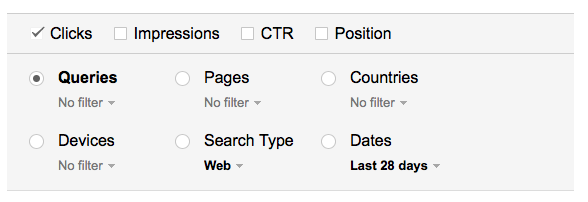
The one we’re going to look at is Pages — this is where you can specify all pages with a file extension PDF. Select the button to the left of Page and click the filter. In the box, type “pdf” and click the blue “Filter” button.

You will then see a list of all the PDFs for which Google has seen traffic, whether via a link on your site, a direct-to-PDF link from some other site that employs Google Analytics, or from a Google search interface. You’ll see something like this:
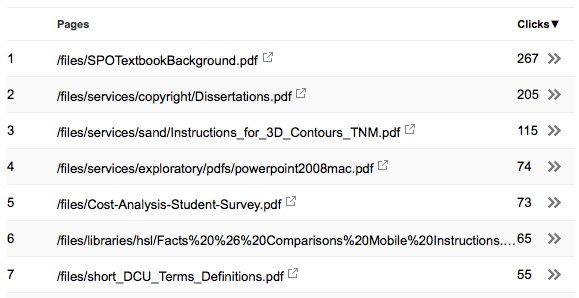
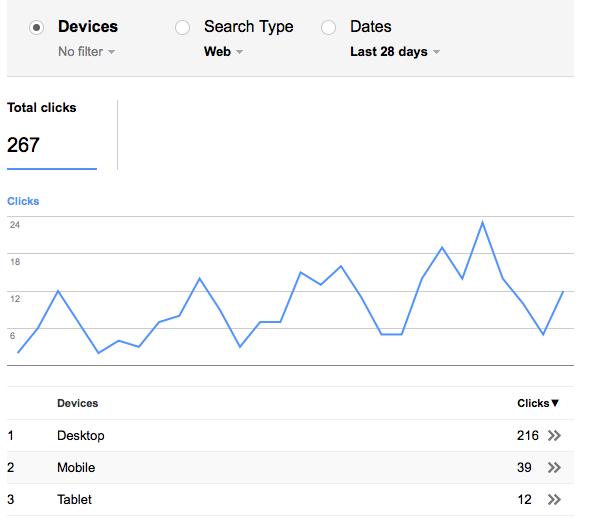
From any PDF in the list, you can click the double arrow on the right to see more detailed statistics for that particular PDF by selecting one of the other search filters (Countries, Devices, Queries, etc.). Here, we see the devices (desktop, mobile, or tablet) that users employed to see the “SPOTextbookBackground.pdf” document):
Why is this count useful? Largely because Google has its hand on vast swathes of the Internet through its analytics code and Google is very good at eliminating robots — they have to be, to prevent unscrupulous folks from inflating advertising revenue through automated clicks on ads. It does not count traffic that originates on websites that do not use Google analytics or that originates from other search indexes (Bing, Yahoo, Baidu, etc.).
The same technique can be used to see who is accessing Microsoft Office (.docx/.doc, .xlsx/.xls, .pptx/.ppt) files, images (png, jpg, gif), or any other binary file on your server.
I learned of this technique from a presentation by Kenning Arlitsch, based on the following article:
Patrick OBrien, Kenning Arlitsch, Leila Sterman, Jeff Mixter, Jonathan Wheeler, and Susan Borda. “Undercounting File Downloads from Institutional Repositories,” Journal of Library Administration, vol. 56, no. 7, 2016. http://dx.doi.org/10.1080/01930826.2016.1216224
 , by Richard Rhodes
 , by Neil Gaiman
 , by Andy Weir
 , by David Weber
 , by John Scalzi
 , by Carl Hiassen
 , by John Scalzi
 , by Kim Stanley Robinson
 , by Mark Russinovich
 , by Earnest Cline
 , by John LeCarré
 , by Neal Stephenson
 , by Jane Smiley
 , by David Brin
 , by Kevin Baker
 , by Robin Sloan
 , by Veronica Roth
 , by Nathan Lowell
 , by Jonathan Bender
 , by Max Brooks